


First stage
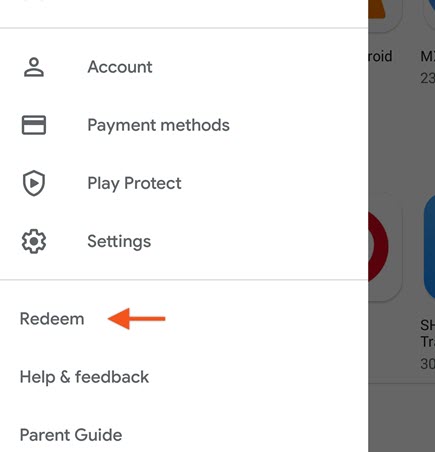
Launch the Play Store app on your Android device.
Tap the ≡ option to open the menu, then tap the Redeem button as shown in the image.
Second stage
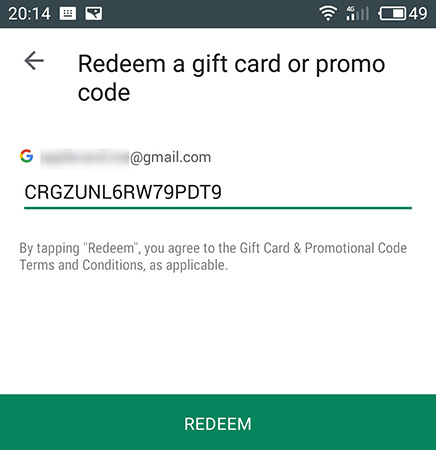
Enter the gift card code.
Be careful when entering the code and avoid using extra characters such as spaces.
After entering the code, click the Redeem option.
Third stage
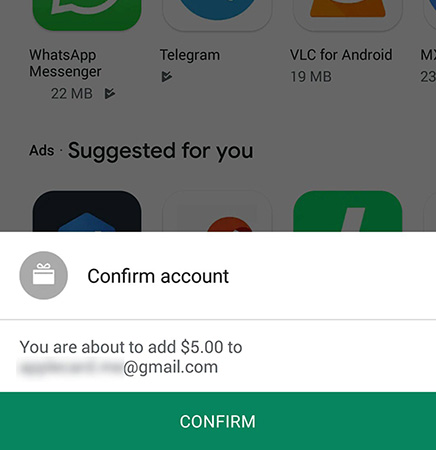
At this point, you will be shown the amount of the gift card and the account to which the gift card will be applied.
You will complete the verification process by clicking the Confirm button.
Step Four
After confirmation, the gift card amount will be added to your Gmail account and you can use it.
Recent posts

How to use a PlayStation gift card

PlayStation Gift Card
Rated 4.00 out of 5 $2,342.00 – $23,423.00Pric...
How to use Google Play gift cards
First stage
Launch the Play Store app on your Android device.Ta...

How to use Apple iTunes gift cards
Apple Gift Card
Rated 3.00 out of 5 $234.00 – $3,453,453.00Price ran...