


First stage
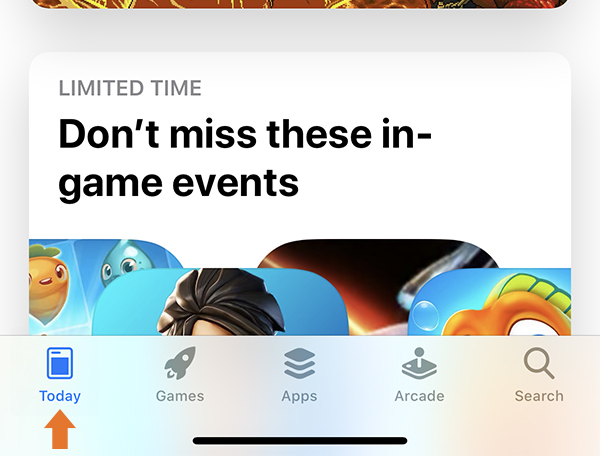
Launch the App Store app on your Apple device.
In the bottom menu of the app, select the first tab, Today.
Second stage
As shown in the image above, select your profile picture at the top right of the screen. If you are not logged in, select Sign In and enter your Apple ID information.

Third stage
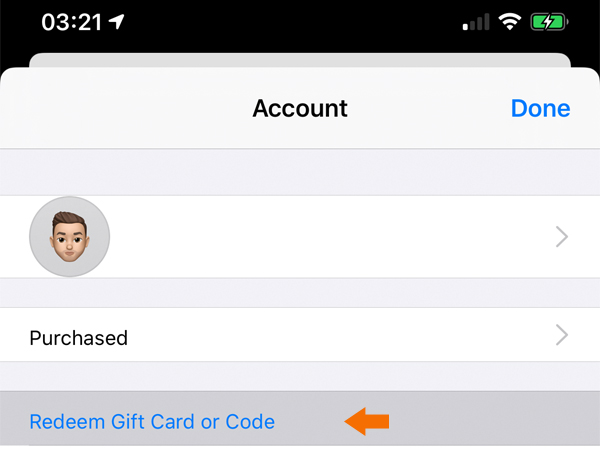
In the window that opens, select "Redeem Gift Card or Code." If you don't see this option in the options, you must be logged in to your Apple ID account.
Step Four
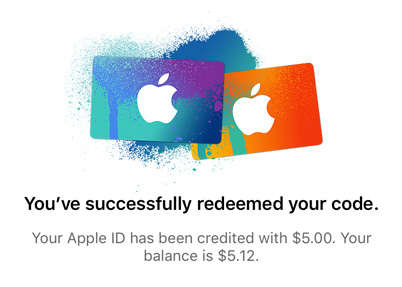
If you have entered the gift code correctly, you will see the message below, now select Done.
If you see the message You must enter a valid code, you have not entered the gift code correctly. Avoid Copy/Paste the code and use the Space key to enter the code.
Recent posts

How to use a PlayStation gift card

PlayStation Gift Card
Rated 4.00 out of 5 $2,342.00 – $23,423.00Pric...

How to use Google Play gift cards
First stage
Launch the Play Store app on your Android device.Ta...
How to use Apple iTunes gift cards
Apple Gift Card
Rated 3.00 out of 5 $234.00 – $3,453,453.00Price ran...